What Is a VPN on iPhone? What It Does and What It Does Not
A VPN on iPhone is an app that sends every connection your phone makes through a server run by the VPN provider. The network carrying your traffic sees one encrypted link and nothing past it, and the sites you open see that server's address instead of yours.
That is the whole mechanism. The part most pages leave out is that the trust moves rather than disappears. The provider now sits where your mobile operator or the cafe router used to sit, which is why the logging policy and who has examined it matter more than any feature list.
iOS installs a VPN at system level, so the tunnel covers every app on the phone once it is on, not just Safari. This page covers what that changes, what it leaves untouched, how to set one up, how to confirm it is really running, and how the iPhone apps of the main providers differ.
What a VPN on iPhone does to your traffic
A VPN on an iPhone is an app that encrypts your phone's internet traffic and routes it through a server the provider operates. The Wi-Fi or mobile network carrying it sees only an encrypted connection to that server. Websites and apps see the server's IP address and location, not your own. The protection covers the whole phone, not one browser.
The useful way to read that is as a change in who can see what. Three things shift, and one thing deliberately does not.
Who is looking | Without a VPN | With the VPN switched on |
|---|---|---|
The Wi-Fi owner or your mobile operator | Can log which sites and apps your phone connects to | Sees one encrypted session with the VPN server and nothing past it |
The site or app you open | Reads your own IP address and the location it maps to | Reads the VPN server's IP address and location |
The VPN provider | Is not in the path at all | Is in the path, and can see what the network used to see |
An account you are signed into | Knows it is you, from the login | Still knows it is you, from the login |
Someone else on the same public network | Can see unencrypted traffic and the names your phone looks up | Cannot read inside the tunnel |
The second row is the one you can verify in under a minute. Open any IP lookup page with the VPN off and note the city and network it reports, then switch the VPN on and reload. If the reported location does not change, the tunnel is not carrying your traffic.
It hides your destinations from the network you are on
On a hotel, airport or cafe network, whoever runs that network can record which servers your phone reaches, even when the content itself is encrypted. Domain names leak through DNS lookups and through the opening handshake of a secure connection. With the tunnel up, that record collapses to a single encrypted session with one address, and the detail behind it stays on the provider's side.
It changes the location that sites and apps see
Sites read the IP address that contacts them and map it to a rough location. Through a VPN that address belongs to the provider's server. This is why a VPN gets reached for when a service behaves differently by country, and also why it often disappoints: plenty of services also check the billing country on the account, the App Store region or the device locale, and none of those move when the IP does.
It moves the trust to the provider instead of removing it
Your traffic has to surface somewhere. Swapping your operator for a VPN company narrows the parties who can observe you to one, and makes that one a company you chose under a policy you can read. That is a real gain, and it is not the same as nobody seeing anything. What decides whether the gain is real is whether the no-logs claim has been inspected by an outside auditor, and whether the published report names the systems it actually looked at.
Why a VPN on iOS covers the whole phone
Apple does not let an app quietly intercept traffic. A VPN app asks permission once, installs a configuration, and from then on iOS hands it the traffic of every app on the device. That is why the first connection triggers a system prompt, and why the configuration ends up in Settings rather than living inside the app alone. A browser extension or a proxy, by contrast, covers only the one app it sits in.
Why the iPhone model does not change the answer
This question often gets typed with a model attached, iPhone 11 or iPhone 13 or something newer. The model is not the variable. VPN support comes from iOS, not from the hardware, so the setting sits in the same place and behaves the same way on every iPhone running a supported version of iOS. What does differ between models is how long a device keeps receiving iOS updates, and a phone stuck on an old release is the one real risk here, because the provider's app will eventually stop supporting it.
How iCloud Private Relay differs from a VPN
Apple ships something VPN-shaped to iCloud+ subscribers and the two get confused constantly. Private Relay is not a way to appear to be somewhere specific, and it does not cover every app the way an installed VPN configuration does. What it covers, and the choice of location it does offer, are set out in Apple's own documentation for iCloud Private Relay, which is where to read the current scope rather than here. Treat it as privacy from your network operator, not as a VPN.
What a VPN on an iPhone will not do
A VPN changes who can watch the pipe. It does not change who you are to the service at the other end, and most disappointment with VPNs comes from expecting the second thing.
It does not make you anonymous
Anonymity would require that nothing in the session identifies you. A signed-in account does, and so do browser fingerprinting, cookies that survive the switch, and the phone number attached to an app. A VPN removes one identifier, your IP address, from a set that has many.
It does not hide you from accounts you are signed into
Opening a social app through a VPN tells that company you connected from somewhere else. It still knows exactly which account did so. Sometimes this is actively worse: a login from an unfamiliar country can trigger a security check, a lockout, or a demand for a code sent to a number you cannot reach from where you are.
It does not replace what HTTPS already does
Most traffic is already encrypted in transit, which is what the lock in the address bar means. A VPN adds a second envelope and, more usefully, hides the addresses written on the outside of the first one. Sold as encryption alone, a VPN is being sold as the fix for a problem the site already fixed.
It does not block ads or trackers on its own
Blocking happens at the DNS layer, and only when the provider adds that feature and you switch it on. Tracking that happens inside the page, through cookies and fingerprinting, is untouched by any tunnel because it never depends on your address.
It is not free of cost in speed or battery
Every packet takes a longer path and gets encrypted twice, and the radio stays busier. How much that shows depends on how far away the server is, which protocol the app uses, and how loaded that server is, which is why the honest answer is to measure it on your own phone with the servers you would actually pick rather than trust a figure from any marketing page.
When switching a VPN on actually changes something
A VPN earns its keep in a few specific situations and does close to nothing in the rest. Knowing which is which is the difference between a tool and a subscription you forget about.
On any network you do not control
Shared Wi-Fi in hotels, airports, conference venues and rentals is where the original argument still holds. You cannot see who else is on the network or what the router is configured to log. Bringing the tunnel up before you join, with an on-demand rule for unknown networks, removes the question instead of answering it.
When a service behaves differently depending on the country
Catalogues and prices split by territory because the rights are sold that way, contract by contract and with end dates, which is why a title shows up in one country and disappears from it a month later. No list of countries is worth printing, including on this page: it would be wrong by the time you read it. Check it the only way that holds, by connecting to the server you care about and opening the service, and remember that the billing country on the account and the App Store region often decide the outcome whatever the IP address says.
When the network itself is blocking things
Campus, hotel and corporate networks filter by destination, and some national networks filter far more. A standard VPN protocol is easy to recognise and can be blocked as a category, which is why providers publish obfuscated or stealth modes that make the tunnel look like ordinary web traffic. If this is the reason you want a VPN, whether such a mode exists in the iOS app, rather than in the desktop app, is the first thing to check.
When it adds very little
At home, on your own router, with a phone talking to sites over HTTPS, a VPN mostly moves your browsing record from your internet provider to your VPN provider. That can still be exactly what you want. It is a different claim from being safer, and worth being clear with yourself about before paying monthly for it.
How to set up a VPN on an iPhone
There are two routes. Installing the provider's app is the right one for almost everyone. The manual route in Settings exists for work networks and self-hosted servers, and it cannot do what most consumer providers now rely on.
Installing the provider's app
Install the app from the App Store, then sign in or create the account. Where the same plan is sold both on the provider's website and as a purchase inside the app, compare the two prices before you commit, because they are separate transactions and need not match.
Tap connect once. iOS shows a system prompt asking to add VPN configurations, and approving it is what lets the tunnel cover every app rather than one.
Open Settings, then General, then VPN and Device Management, and confirm the configuration is listed and marked connected.
In the app's own settings, choose the protocol and switch on the kill switch or always-on option if the iOS app offers one.
Adding a configuration by hand in Settings
Settings, then General, then VPN and Device Management, then VPN, then Add VPN Configuration. iOS asks for a type and offers IKEv2, IPsec and L2TP, then for a description, a server address, a remote ID, and either an account and password or a certificate. Those details come from whoever runs the server, usually an employer. Note what is missing from that list: WireGuard and the providers' own protocols cannot be added this way, so a manual configuration will not give you NordLynx, Lightway or WireGuard. That is the practical reason the app route wins.
Setting an on-demand rule so it does not quietly stay off
A VPN that was off at the moment you needed it is the common failure, and nothing on screen announces it. Most iOS apps carry an auto-connect or on-demand setting that brings the tunnel up whenever the phone joins a network you have not marked trusted. Switch it on, then test it by joining a different network and watching for the status badge. iOS can also drop a tunnel when the phone changes network or wakes from sleep, which is what a kill switch setting is there to catch.
How the iPhone apps of the main providers differ
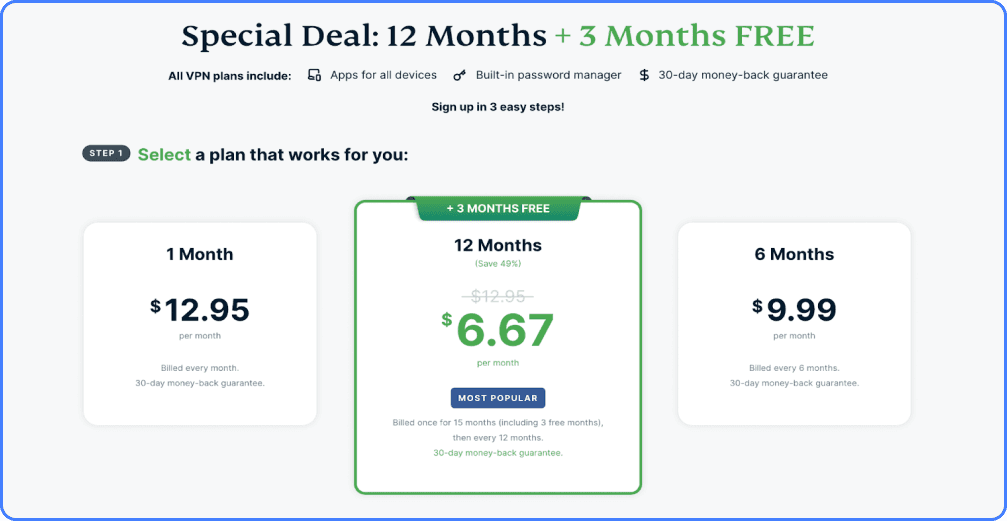
The services people weigh up for iPhone differ less in whether they work and more in the shape of the plan and in what their iOS app actually exposes. Neither of those is measured on this page, and neither holds still: device limits, the protocols an app offers and which features reach iOS at all are changed without an announcement. So the thing worth carrying away is not a feature grid that is stale by the time you read it, but the one gap that keeps catching people out after payment.
That gap is this: the feature list a provider advertises usually describes its desktop app. Kill switches, split tunneling and content filtering appear on iOS unevenly, because Apple's rules for network extensions constrain what an app is allowed to do. Before paying, open the provider's own iOS page or its App Store listing and confirm the one feature you came for is named there for iPhone specifically. A feature named only on a homepage or only in a comparison grid has not been promised to you on a phone.
What to settle per provider before you pay
Four questions separate these apps, and each has to be answered on the provider's own current pages rather than from any list, including this one.
Whether the plan's simultaneous-connection limit covers the devices you actually own. This is a plan term rather than a property of the app, it differs per provider and sometimes per tier, and the checkout page is where it binds.
Which protocols the iOS app itself lets you pick. A protocol list on a front page can describe the service as a whole, and a protocol the service runs is not automatically a protocol the iPhone app offers you.
Whether a kill switch, split tunneling or an obfuscated mode is present in the iOS app's own settings screen. Present in the settings screen is the test, not described in the marketing.
What the refund terms are, because that window is the only way to test any of this on your own phone and your own network at no cost.
Longer assessments of each sit on the review pages for ExpressVPN, NordVPN, Surfshark, Proton VPN, IPVanish and CyberGhost. How we order these services against each other is set out on the ranking page.
How to confirm the VPN is really carrying your traffic
An app that looks connected is not evidence. Three checks, in rising order of usefulness.
The VPN badge in the status bar
iOS shows a small VPN indicator while a configuration is active. It confirms that a tunnel exists. It does not confirm that the tunnel is the one you think it is, that it is routing everything, or that DNS lookups are going through it.
Check what the outside world sees
Open an IP lookup page and a DNS leak test with the VPN off, then open both again with it on. The address and the reported location should both change, and the DNS servers listed should belong to the VPN provider rather than to your internet provider. If the location changes but the DNS does not, lookups are leaking and the network can still see which sites you asked for.
Watch what happens when the connection drops
Put the phone in airplane mode for a moment, or walk out of Wi-Fi range, then check whether traffic resumes with the tunnel or without it. A provider that offers a kill switch on iOS holds traffic until the tunnel is back. Without one, the phone quietly reverts to the open network, and that is the exact moment a VPN was supposed to cover.
What to weigh before paying for one
Four things decide whether a VPN subscription was worth the money, and the server count is not among them.
The logging policy, and who has examined it
Every provider claims to keep no logs. The claim starts to be worth something when an outside firm has inspected the running systems and published what it looked at, and when that report is recent enough to describe the infrastructure as it stands now. A policy page on its own is a promise. An audit that names the servers and the data stores is evidence.
Where the company sits, and who can compel it
Jurisdiction decides which authority can demand data and whether the company is permitted to say it was asked. This matters less when there is genuinely nothing stored, which is why it belongs after the audit question rather than before it.
Whether the iOS app carries the feature you are buying
The gap between a provider's desktop app and its iPhone app is the single most common surprise after payment. If you are buying for a kill switch, a stealth protocol or split tunneling, find that word on the provider's iOS page before you pay, not on the homepage.
The refund window
Speed on your own network, with your own phone, on the servers you would actually use, is the only test that counts, and no published figure substitutes for it. What makes that test free is the refund window, and both its length and its conditions differ per provider, so read them on the checkout page before you pay rather than after. Test inside whatever that window turns out to be, in its first days rather than its last, and leave if the answer is bad. A shortlist, including the one on our ranking of VPN services, narrows the field but does not replace that test.
Questions people ask about VPNs on iPhone
Does an iPhone have a VPN built in?
It has the client, not the service. Settings can hold a VPN configuration, but something has to run the server at the other end, and that is the part you subscribe to. The closest thing Apple runs itself is iCloud Private Relay for iCloud+ subscribers, which is narrower than a VPN and is described further up this page.
Are free iPhone VPNs worth using?
Running servers costs money, so a free service is funded some other way: an upsell, a tight data allowance, injected advertising, or the resale of connection data. The first two are honest and the last two defeat the point of installing a VPN at all. The one coherent shape of free is a limited tier from a provider that also sells a paid plan, Proton VPN being the usual example, because the paying customers are covering the servers.
Is using a VPN on an iPhone legal?
In most countries yes, and corporate use is routine. A small number of states restrict or ban services that are not licensed there, and those rules change, so check the current position for the country you are physically in rather than relying on an article. A VPN also does not make an otherwise illegal act legal.
Should the VPN stay on all the time?
Leaving it on is the simplest policy and costs some battery. Some things break with it on: banking and payment apps that read a foreign address as fraud, local device features that expect to see the same network, sign-in pages on hotel Wi-Fi, and anything that checks your location on purpose. Most iOS apps allow per-network rules, so the sensible middle setting is always on away from home and off on the networks you trust.
Does a VPN make public Wi-Fi safe?
It removes one class of problem, which is the network watching or tampering with your traffic. It does nothing about the other classes: a phishing page you type a password into, an app with a weak login, or someone reading the screen over your shoulder. Safer on that one axis, not safe.
If you make a purchase via one of these links, we may earn a commission, at no extra cost to you. Learn More